iPad and iPhone
Argyle for iPad and iPhone
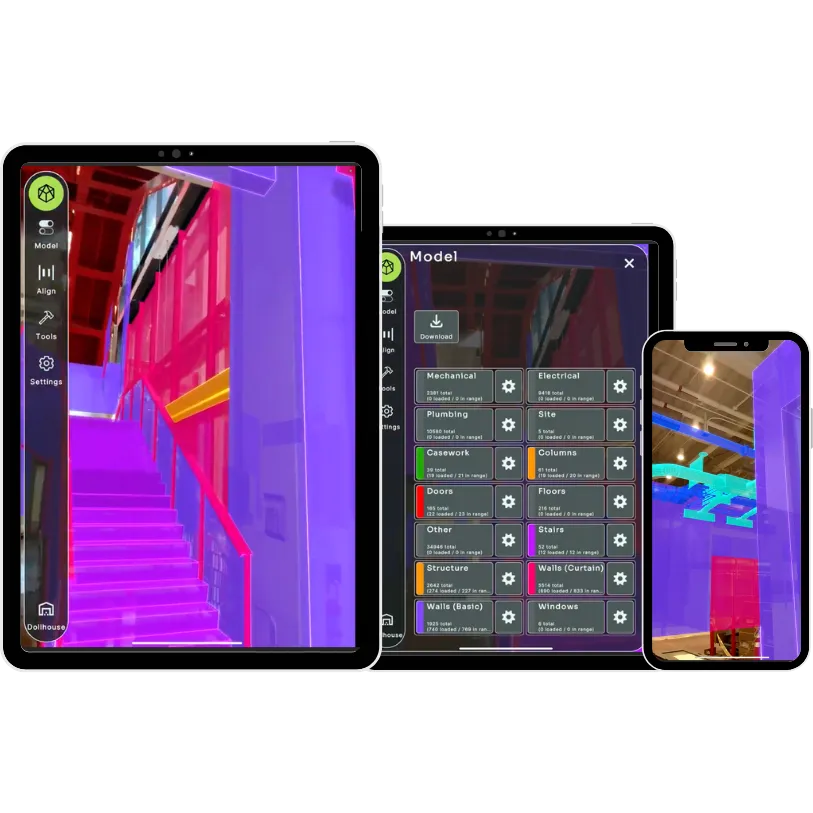
See your BIM model at full scale on the jobsite with the devices your crews already carry. Verify installs, capture photos and link every issue back to the model.
Argyle is an augmented reality platform for construction that overlays coordinated BIM models on the jobsite so teams can verify installs, log spatial observations, and share field data in real time.
SOC 2 compliant
What your team can do
See the model on site
Walk the jobsite with your coordinated Revit or Navisworks model overlaid in AR, at full scale, right where it will be built.
Snap to printed QR codes
Scan a site QR code to open the right project and lock the model to your coordinates, so it stays aligned as you move.
Verify installs while fixes are still cheap
Compare what is installed against the coordinated model before walls close and ceilings go in.
Capture observations in place
Pin notes, photos and AR video clips to the exact spot in the model, with a status your team can track.
Live stream to the office
Start a live stream from the field so the office sees what the crew sees. Observations land in the Argyle web portal for VDC and QA/QC to review.
Layers and metadata
Turn model layers on and off and check element metadata on site.
How it works
From your model to the jobsite in four steps.
Publish your model from Revit or Navisworks with the Argyle add-ins, or export from ACC in the Argyle portal.
Set the X, Y and Z coordinates of your site QR codes in the Argyle portal.
Print and place the QR codes on site. Scan one and the model snaps into place.
Walk the site, verify installs and log observations that sync back to the office.
Devices and requirements
Argyle runs on the iPhone and iPad your crews already carry.
- iPhone or iPad running iOS or iPadOS 13.0 or later. LiDAR is not required.
- Runs offline with no Wi-Fi needed.
- Models from Autodesk Revit or Navisworks 2024 to 2026 through the Windows add-ins, or from ACC through the Argyle portal.
- All apps and add-ins are on the Downloads page.
FAQ
Frequently asked questions
Is there an AR BIM app for iPad?
Yes. Argyle for iPad and iPhone overlays your coordinated BIM model on the jobsite at full scale so crews can verify installs and log observations.
Can I view a Revit or Navisworks model on an iPad on site?
Yes. Publish your model with the Argyle Revit or Navisworks add-in, then open it in the Argyle app on iPad or iPhone and snap it to a site QR code.
Does the Argyle iOS app need LiDAR?
No. Argyle runs on iPhone and iPad with iOS or iPadOS 13.0 or later, and LiDAR is not required.
Does Argyle work offline?
Yes. Runs offline with no Wi-Fi needed.
Do I need a headset to use Argyle?
No. Argyle runs on the iPad and iPhone your crews already carry.
How accurate is model alignment?
Argyle is built for visual install verification across the jobsite. Alignment depends on how you place and survey your QR codes, and we help you plan the setup for your site. Use survey tools for layout.
Where do I get the app?
Download Argyle Build from the App Store. Your team signs in with its Argyle account. To set up an account, talk to us about a pilot.
Is Argyle secure?
Argyle is SOC 2 compliant.
See your model on your site
Tell us about your project and we will follow up about a pilot for your team.
Work email only. We use it to follow up about a pilot.